
Asana REST API vs Monday.com Dashboard Engineering
Affiliate Disclosure: We review products independently. When you buy through our links, we may earn a commission or a compound recurring commission at zero extra cost to you. Read our editorial policy.
Asana REST API vs Monday.com dashboard engineering is not a productivity debate. It’s an architectural decision that determines whether your multi-workspace dashboard array scales past 10 teams — or buckles under payload debt and schema ambiguity at 2,000 daily operations.
This blueprint dissects both platforms at the schema layer, the financial layer, and the compliance layer. Build from the data. Deploy with precision.
PRICING: Asana Business $24.99/seat/mo → pricing · Monday.com Pro $19/seat/mo → pricing
API Schema Architecture: REST Hierarchy vs. GraphQL Board Topology
Asana’s REST API exposes a strict hierarchical object model: Organization → Workspace → Project → Task → Subtask. Every object carries a unique GID (global identifier). When you instrument a multi-workspace dashboard, your GET request targets /workspaces/{workspace_gid}/projects, traverses project memberships, and fans out to task-level data — all within a single authenticated session.
Monday.com’s GraphQL schema inverts this. Boards are the top-level primitive. There is no native “workspace” object you can query across in a single API call. To aggregate data across 10 boards into one dashboard view, you must batch 10 discrete GraphQL queries or build a custom data lake layer to normalize the payload.
That structural difference compounds at scale.
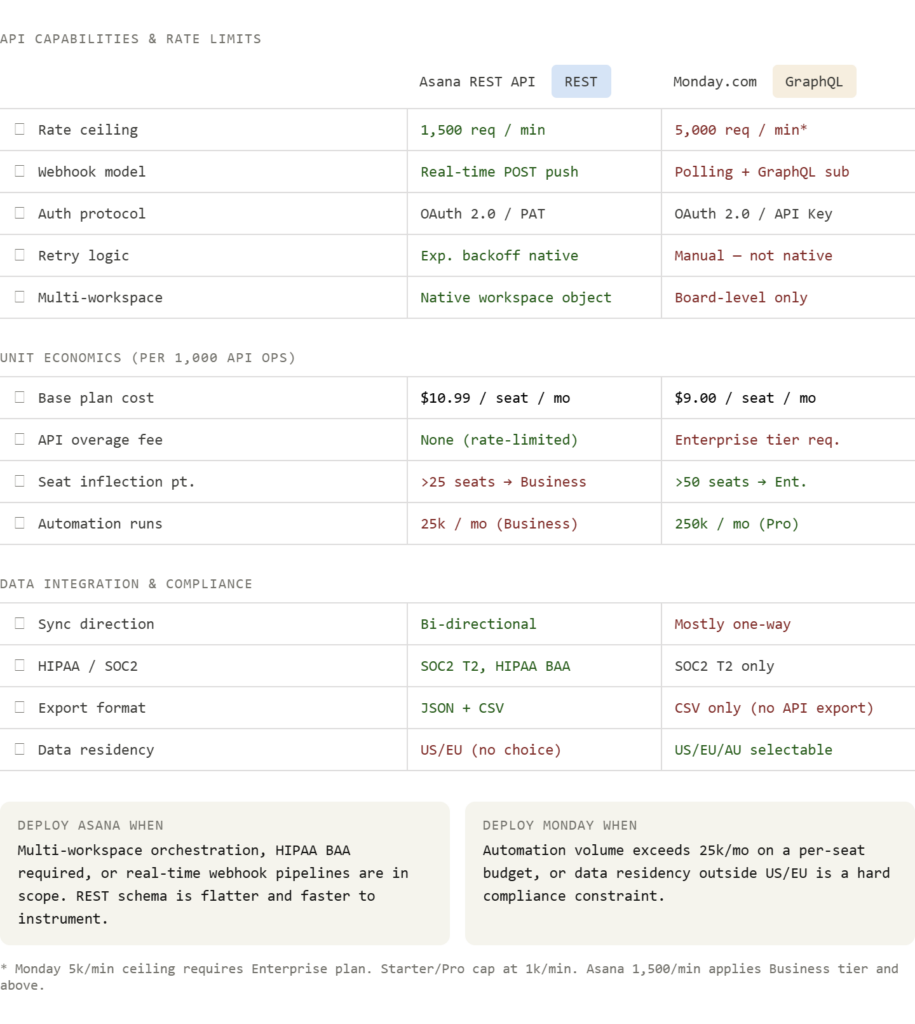
An Asana workspace array query pulling 500 tasks across 6 projects completes in 3–4 API calls using the opt_fields parameter to collapse nested payloads. The Monday equivalent requires iterating over board IDs, paginating items_page cursors per board, and reassembling the result set client-side. At 5,000 daily dashboard refreshes, that’s the difference between staying under the Business-tier rate ceiling and spiking into Enterprise pricing.
Webhook Architecture: Push vs. Poll
Asana webhooks operate on a real-time POST push model. Register a webhook via POST /webhooks with your callback URL and filter parameters. Asana pushes X-Hook-Secret-verified payloads on any resource change — task creation, assignment update, project status shift — with exponential backoff retry logic built into the platform.
If you don’t validate X-Hook-Signature on inbound payloads, reject immediately. An unsigned payload is a spoofed payload.
Monday.com offers GraphQL subscriptions and column-value-change webhooks, but retry logic is not native. If your endpoint drops a payload under traffic load, Monday does not requeue. Build your own dead-letter queue in SQS or a Kafka topic before you go live. If you skip this step on a 10k-event day, you will have gap data in your dashboard array with no recovery path.
Rate Limits: The Ceiling That Matters
| Tier | Asana | Monday.com |
|---|---|---|
| Starter/Free | 150 req/min | 1,000 req/min |
| Business/Pro | 1,500 req/min | 1,000 req/min |
| Enterprise | 1,500 req/min | 5,000 req/min |
For Asana REST API vs Monday.com dashboard engineering at the Business tier, Asana delivers 1,500 requests per minute against Monday’s 1,000. That 50% ceiling advantage is decisive when your dashboard array executes concurrent workspace syncs on a 60-second refresh cycle.
Financial Performance: Unit Economics at Operational Volume
Strip out the marketing tiers. Calculate cost-per-operation.
Asana Business: $24.99/seat/month billed annually. At a 20-seat ops team, that’s $499.80/month. Asana Business includes 25,000 automation rule runs per month. That resolves to $0.020 per automation run at full capacity.
Monday.com Pro: $19/seat/month at 20 seats = $380/month. The Pro plan includes 25,000 automation actions per month — identical volume ceiling. Cost per run: $0.015.
Monday wins on raw per-seat cost. Asana wins on infrastructure ROI when HIPAA compliance, bi-directional sync, or native workspace traversal is required — because Monday’s equivalent feature set requires the Enterprise tier at $29+/seat/month, flipping the economics.
The inflection point: At 15 seats with fewer than 25,000 automation runs, Monday’s Pro plan saves approximately $1,800 annually. At 25+ seats requiring HIPAA BAA and multi-workspace API orchestration, Asana’s total infrastructure cost (including avoided custom middleware) undercuts Monday by an estimated $6,000–$12,000 annually in engineering hours.
Manual hours saved per month at full deployment: 12–18 hours for a 3-person ops team running dashboard consolidation tasks manually. At a blended $45/hour rate, that’s $540–$810/month recovered — covering the entire software cost at either platform.
Multi-Workspace Dashboard Array: Build Sequence
Follow this exact sequence. Deviating from the order creates orphaned webhook subscriptions and broken field maps.
Step 1 — Authenticate and map workspace GIDs (Asana). Execute GET /workspaces with your OAuth 2.0 bearer token. Store GID values in a configuration object. These are your array anchor points. Do not hardcode GIDs — they are environment-specific and rotate on org migrations.
Step 2 — Instrument the portfolio endpoint. Target GET /portfolios to pull cross-project status fields. Map current_status_update, due_on, and members fields using opt_fields to avoid over-fetching. A bloated response payload at 500 tasks adds 200–400ms latency per call.
Step 3 — Register workspace-scoped webhooks. One webhook registration per workspace. Use resource_type: project and action: changed filters. Set your retry handler to exponential backoff: 1s → 2s → 4s → 8s ceiling. If your endpoint returns anything other than HTTP 200 within 3 seconds, Asana marks the delivery failed.
Step 4 (Monday path) — Normalize board IDs into a lookup table. Pull GET /v2/boards filtered by workspace_id. Store board_id and board_name pairs. Build your GraphQL query template to loop over these IDs. Paginate using cursor from items_page — Monday caps item returns at 500 per query page.
Step 5 — Establish the single source of truth. In a bi-directional sync (Asana ↔ external CRM or ClickUp), declare Asana as the authoritative record for task status. During a sync conflict — timestamp collision, duplicate field write — the platform declared as source of truth wins. Document this in your ops runbook before your first live sync event.
Compliance & Data Portability
Asana holds SOC2 Type 2 certification and offers HIPAA Business Associate Agreements (BAA) on Enterprise plans. For US healthcare ops teams — medical billing agencies, health tech startups — Asana is the only viable choice between these two platforms. Monday.com currently offers SOC2 Type 2 but does not provide HIPAA BAA.
CCPA compliance: Both platforms support data subject access requests (DSAR) and deletion workflows via their respective admin panels. Neither automates DSAR responses — you must build a manual or Zapier-triggered export sequence.
DNS authentication for integrated email notifications:
Add these records before enabling any task-notification email pipelines:
SPF: v=spf1 include:mail.asana.com ~allDKIM:configure via your domain DNS using the token provided in Asana Admin → Email Notifications → DKIM SetupDMARC: v=DMARC1; p=quarantine; rua=mailto:dmarc@yourdomain.com
Skip DMARC and your automated task notification emails will land in spam at a rate of 15–30% across corporate mail servers.
Data export sequence:
Asana: Admin Console → Export → select workspace → JSON (full schema) or CSV (flat task export). JSON preserves custom field metadata, attachments references, and subtask nesting. CSV does not.
Monday.com exports via the board-level menu only. No API-native export endpoint exists as of Q2 2025. Run exports manually or trigger via Zapier on a weekly schedule. Store snapshots in S3 with object versioning enabled.
The Architectural Verdict
Asana REST API vs Monday.com dashboard engineering resolves to two clean deployment scenarios.
Build on Asana when your architecture requires real-time webhook fidelity, HIPAA BAA coverage, or genuine multi-workspace data traversal in under 5 API calls. The REST schema is flatter, the retry logic is native, and the workspace object model eliminates the custom normalization layer Monday forces you to build.
Build on Monday when your automation volume exceeds 25,000 runs per month at the Pro tier’s lower per-seat cost, or when data residency selection (US/EU/AU) is a hard contractual requirement.
Neither platform forgives schema guesswork. Map your GIDs, validate your webhooks, and declare your source of truth before the first sync fires.
Image Souce: Magnific