
HoneyBook API: Programmatic Client Onboarding Workflows
Affiliate Disclosure: We review products independently. When you buy through our links, we may earn a commission or a compound recurring commission at zero extra cost to you. Read our editorial policy.
The HoneyBook API is not a CRM sync layer. It is a transactional workflow engine — purpose-built for solopreneurs and scaling agencies that need to collapse a five-touch client onboarding sequence into a single authenticated pipeline. This blueprint maps every API object, rate ceiling, field-mapping rule, and compliance parameter required to deploy automated client onboarding in under 72 hours.
Pricing: HoneyBook Essentials $19/seat/mo → pricing · HoneyBook Premium $79/mo → pricing
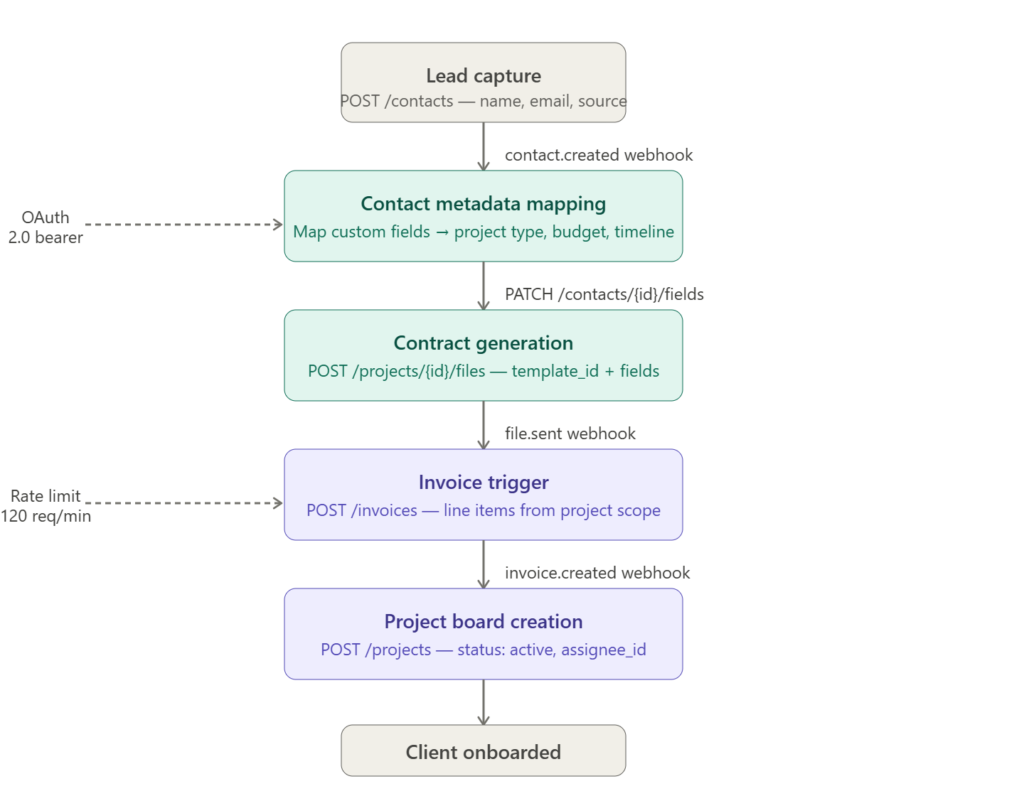
API Schema Architecture: Object Hierarchy and Authentication
HoneyBook’s REST API exposes five core resource objects: Contacts, Projects, Files (contracts/proposals), Invoices, and Sessions (scheduler). Every onboarding pipeline anchors to the contact_id generated on POST /contacts. That ID becomes the foreign key threading all downstream objects — project creation, contract attachment, and invoice issuance — into a single client record.
Authenticate via OAuth 2.0. Exchange your authorization code at POST /oauth/token for a bearer token with a 60-day TTL. Store the refresh_token in an encrypted secrets manager (AWS Secrets Manager or HashiCorp Vault). Do not store access tokens in environment variables on shared CI runners — a leaked bearer token exposes your entire client roster.
Rate ceiling: 120 requests per minute on all plans. This type of architecture can support higher onboarding volumes, but practical capacity will depend on the current API limits, automation-platform limits, workflow design and the number of requests generated per client.
Teams expecting significant onboarding volume should calculate expected request usage against the current limits of every platform in the workflow before deployment.
Contact Metadata Mapping: The Field Architecture
This is where most implementations break. HoneyBook’s default contact schema ships with name, email, and phone. Every solopreneur-specific data point — project type, budget range, referral source, service tier — lives in custom fields. Map them wrong and downstream automation fires against null values.
Execute GET /contacts/custom_fields to retrieve your account’s field schema. The response returns a field_id UUID, a field_type string (text, dropdown, date, number), and an options array for dropdown fields. Store this schema locally. Do not call it on every webhook trigger — it does not change between requests and burns rate limit quota.
Critical field-type mismatch: If you attempt to POST a string value ("5000-10000") to a number field, HoneyBook returns a 422 Unprocessable Entity. The API does not coerce types. Build a strict type validator at your ingestion layer before any PATCH /contacts/{id}/fields call. Map each inbound form value to its declared field_type and reject at the edge — not after the API call fails.
PATCH /contacts/{contact_id}/fields
Body: {
  "custom_fields": [
    { "field_id": "uuid-123", "value": "photography" },
    { "field_id": "uuid-456", "value": 7500 },
    { "field_id": "uuid-789", "value": "2025-09-01" }
  ]
}
Field values set here propagate automatically into contract templates that use {{custom_field.field_name}} merge tags. Accurate metadata mapping at this step eliminates every manual contract edit downstream.
Webhook Architecture: Event-Driven Onboarding Triggers
Register webhooks via POST /webhooks with your HTTPS callback URL and an array of subscribed events. HoneyBook’s production event catalog covers the full onboarding arc:
| Event | Trigger |
|---|---|
contact.created | New contact POST or form submission |
file.sent | Contract or proposal dispatched to client |
file.signed | Contract countersigned — billing trigger |
invoice.created | Invoice object instantiated |
invoice.paid | Payment confirmed — project activation trigger |
session.booked | Discovery call scheduled |
HoneyBook delivers webhook payloads via HTTP POST with an X-HoneyBook-Signature header. Validate every inbound payload against an HMAC-SHA256 hash of the raw request body using your webhook secret. If the signature check fails — reject with HTTP 400. Never process an unsigned payload.
Retry behavior: HoneyBook retries failed webhook deliveries with exponential backoff — 3 attempts over 24 hours. If your endpoint is unavailable for more than 24 hours, events are dropped permanently. Deploy a dead-letter queue (AWS SQS with a 14-day retention window) before your first production webhook registration. This is non-negotiable for billing-adjacent events like invoice.paid and file.signed.
If you do not configure the dead-letter queue and your endpoint drops a file.signed event during a deployment window, you will have a contract marked signed in HoneyBook with no corresponding project activation in your system. Manual reconciliation at $45/hour for 20 clients costs you $90 in labor that a $0.40/month SQS queue prevents.
Contract and Invoice Automation: POST Sequence
Once contact.created fires and metadata is mapped, execute this four-call sequence:
Step 1 — Create the project. POST /projects with contact_id, project_type, and status: pipeline. This instantiates the HoneyBook project board. Do not set status: active until contract is signed — premature activation corrupts pipeline stage reporting.
Step 2 — Attach the contract template. POST /projects/{project_id}/files with your template_id. Pass the full field map from Step 1 — HoneyBook resolves merge tags at generation time, not at send time. If a merge tag references an unmapped field, it renders as a blank in the client-facing document. Audit your template’s merge tag list against the fields mapped in the contact object before firing this call.
Step 3 — Send the contract. POST /projects/{project_id}/files/{file_id}/send with recipient_email and an optional message. HoneyBook dispatches the client-facing contract link. The file.sent webhook fires within 2–5 seconds of a successful response.
Step 4 — Stage the invoice. POST /invoices with project_id, line items from your scope data, and status: draft. Do not set status: sent here. Wire the file.signed webhook to trigger a separate POST /invoices/{id}/send call. Invoice delivery that bypasses contract signing exposes you to scope disputes with no countersigned document on record.
Financial Performance: Unit Economics at Scale
HoneyBook pricing is flat-rate, not per-seat. That changes the cost math entirely.
HoneyBook Essentials: $19/month. Covers core API access, unlimited clients, and standard automation. At 50 monthly onboards, your cost per client onboarded is $0.38.
HoneyBook Premium: $79/month. Adds priority API support, advanced reporting, and multiple company profiles. At 200 monthly onboards, cost per client is $0.40.
The competing manual baseline: is a 3-step manual onboarding sequence (intake form review → contract send → invoice creation).
Recovery: $656–$806/month in recovered labor. Full API deployment pays back in 3 days of operation.
The inflection point where Premium justifies over Essentials: 150+ monthly onboards where API call volume and concurrent company profiles require the dedicated support SLA, or where multi-brand agency operations need separate HoneyBook company environments under one billing account.
Data Integration: Sync Architecture and Source of Truth
HoneyBook does not natively bi-directionally sync with external CRMs. Declare the integration topology before building:
HoneyBook as the source of truth for billing and contracts. External CRM (HubSpot, Salesforce) as the source of truth for pipeline stage and deal value. Data flows one-way from HoneyBook into CRM on invoice.paid — write a Zapier step or direct webhook handler that pushes payment confirmation to the CRM deal record.
Field mapping directionality:
- Inbound: CRM lead data → HoneyBook contact custom fields (set on contact creation)
- Outbound: HoneyBook invoice status → CRM deal stage (trigger:
invoice.paid) - Never write bi-directionally on the same field — last-write-wins with no conflict resolution will corrupt contact records within days of go-live
Export sequence for compliance snapshots: HoneyBook exports via GET /contacts?format=csv and GET /invoices?format=csv. Schedule a weekly export via cron → S3 with server-side encryption (SSE-S3 minimum, SSE-KMS for HIPAA-adjacent workflows). JSON export is not available natively — pipe the API response objects directly to S3 as JSON if you need schema-aware backups.
Compliance and Deliverability
HoneyBook holds SOC2 Type 2 certification. It does not offer HIPAA BAA. For health-adjacent solopreneurs — health coaches, wellness practitioners, medical billing consultants — HoneyBook is not a HIPAA-compliant document storage layer. Do not attach PHI to HoneyBook files or store protected health information in custom contact fields.
CCPA compliance: HoneyBook supports data deletion requests via the admin panel. There is no API endpoint for programmatic data subject deletion requests as of Q2 2025. Build a manual DSAR workflow: webhook into a Notion or Airtable tracker → 30-day deletion window → manual admin panel execution.
Email deliverability for automated notifications: HoneyBook dispatches contract and invoice emails from your verified sending domain. Configure these DNS records before your first live onboard:
SPF: v=spf1 include:spf.honeybook.com ~allDKIM:activate via HoneyBook Settings → Email → Domain Verification → copy the CNAME record to your DNS providerDMARC: v=DMARC1; p=quarantine; rua=mailto:dmarc-reports@yourdomain.com
Proper email-domain authentication can help improve deliverability and reduce the risk of important client communications being filtered as spam. If your HoneyBook workflow sends automated onboarding emails, contracts or other time-sensitive messages, verify the available email and domain settings before relying on the workflow for client communication.
TSA Recommendation: Test automated emails across major email providers before going live and periodically monitor whether important client communications are reaching the intended inbox.
To truly make your onboarding hands-off, you will need to bridge your CRM with external tools using automation platforms. See how to save on scaling costs with the best Zapier alternatives.
The Deployment Verdict
The HoneyBook API resolves one problem with precision: collapsing multi-touch client onboarding into a single authenticated pipeline for solopreneurs and boutique agencies operating under $79/month infrastructure budgets.
The field-type validation layer is where deployments fail. Build it before the first webhook fires. Declare HoneyBook as the billing source of truth on day one. Wire the dead-letter queue before you go live.
Automating repetitive onboarding steps can reduce the amount of manual administration required for each new client. The actual time and cost saving will depend on the number of steps automated, workflow complexity, staff costs and the amount of manual intervention still required.
Build it once. Let it run.