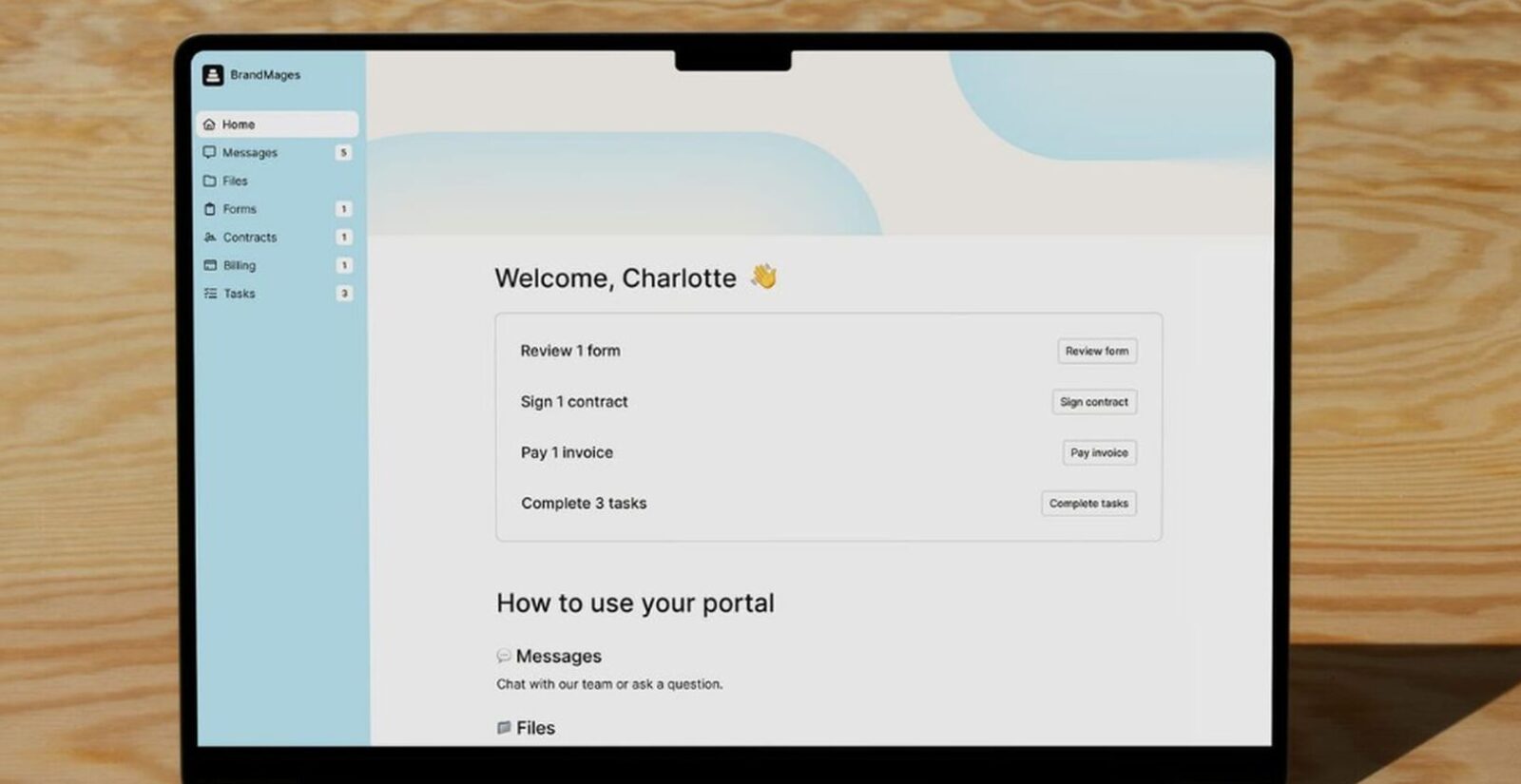
Copilot Review (2026): Best White-Label Client Portal for Modern Agencies?
Affiliate Disclosure: We review products independently. When you buy through our links, we may earn a commission or a compound recurring commission at zero extra cost to you. Read our editorial policy.
| BRAND UPDATE: Copilot.com rebranded to Assembly in 2025. The platform now operates at assembly.com. This Copilot review covers the product under its current Assembly brand name — features, pricing, and positioning are unchanged from the Copilot platform most agencies evaluated. The slug /copilot-review/ remains the correct search target. |
This Copilot review covers the platform formerly known as Portal, rebranded to Copilot in 2022, and again to Assembly in 2025. The product is the same across all three names: a white-label client portal that consolidates messaging, file sharing, contracts, invoices, and forms into one branded workspace. G2 rates it 4.8/5 across 300+ reviews. The UX is the most polished in the client portal category. The hidden cost most buyers miss: full white-label — removing the ‘Powered by Assembly’ badge — requires the Advanced plan at $399/month, not the $149/month Professional plan agencies typically evaluate first.
Updated: May 2026. All pricing sourced directly from Assembly. Feature gates verified against current plan documentation.
Assembly (Copilot) at a Glance
| Category | Detail |
| Current brand | Assembly (formerly Copilot.com / Portal) — rebranded 2025 |
| G2 rating | 4.8/5 (300+ reviews) |
| Free trial | 14 days, no credit card required |
| Starter plan | $39/month — 1 internal user, 50 clients, 100 automations/month |
| Professional plan | $149/month — 3 internal users (+$39/user), 500 clients, 1K automations/month, custom domain |
| Advanced plan | $399/month — 5 internal users (+$59/user), unlimited clients, unlimited automations, full white-label |
| Enterprise plan | $2,000+/month — custom seats, unlimited everything, dedicated support |
| White-label removal | Advanced plan ($399/mo) — ‘Powered by Assembly’ badge removed here, not Professional |
| Native mobile app | No standalone app — mobile-responsive web portal only |
| Native automation depth | Limited — basic trigger/action workflows; no conditional branching |
| CRM | Built-in lightweight CRM on all plans — not a replacement for Salesforce/HubSpot |
| Payment processing | Stripe-native — invoices, subscriptions, usage-based billing |
| eSignatures | Native — legal-grade, no DocuSign subscription required |
| HIPAA compliance | Advanced plan and above — requires signed BAA |
| QuickBooks integration | Available — reviewers note integration issues in G2 |
| API + Zapier + Make | Professional plan and above |
What Assembly (Copilot) Actually Does
Assembly replaces the scattered communication stack most agencies run by default: email threads for client updates, Dropbox or Google Drive links for file delivery, DocuSign for contracts, Stripe invoicing for payments, and Loom links embedded in emails for video walkthroughs. Every one of those touchpoints moves into a single branded portal your client logs into with their own credentials.
The client-facing experience is the product’s strongest argument. Clients access their portal on a custom domain — portal.youragency.com — see your logo and brand colors, receive notifications from your business email domain, and interact with proposals, files, tasks, and invoices without ever seeing a third-party tool’s branding. That client experience is what agencies are actually paying for.
What it is not: A project management platform. Assembly’s task and project management is basic — lists and assignments, no Gantt charts, no task dependencies, no timeline views, no workload management. Agencies managing complex delivery workflows alongside client portals run Assembly for client communication and a separate tool (Asana, ClickUp, Linear) for internal project delivery.
The Three-Name Problem: Portal → Copilot → Assembly
The platform has operated under three brand names in five years. Portal (2020–2022) → Copilot (2022–2025) → Assembly (2025–present). The domain moved from portal.io to copilot.com to copilot.app to assembly.com. Search results, review sites, and agency directories still list the product under all three names, creating genuine confusion about whether Assembly, Copilot, and Portal are the same tool.
They are. Same company, same product, same feature roadmap. The Assembly brand reflects a positioning shift toward agency operations and team workflows rather than the solo-freelancer “cockpit” framing of the Copilot era.
Why it matters for buyers: If you’re searching ‘Copilot review’ or ‘Portal client portal review’ and landing on Assembly documentation, you’re in the right place. If a proposal from an agency references ‘the Copilot portal,’ verify the domain before assuming it’s Microsoft Copilot or any other product sharing the name.
Core Features: What Works, What’s Limited
Client Portal and White-Label Branding
The portal UX is Assembly’s strongest differentiator. Each client gets a dedicated portal login with your domain, logo, brand fonts, and colors applied throughout. The interface is clean, modern, and mobile-responsive — clients navigating their portal on a phone or tablet encounter a competent web experience even without a native app.
The white-label gap: The ‘Powered by Assembly’ badge appears on client portal sign-in pages, email notifications, and payment checkout flows on Starter and Professional plans. Removing it requires the Advanced plan at $399/month. Agencies evaluating this Copilot review on the Professional plan at $149/month and building a full white-label pitch to clients need to account for this upgrade cost before the first client portal goes live.
Messaging and Client Communication
Secure in-portal messaging with email fallback keeps client communication off personal inboxes. Every message thread is tied to the client record — no digging through Gmail for that attachment from six months ago. The team inbox consolidates all client messages for agency teams, with notification routing to the relevant account manager.
Capterra reviewers consistently cite this as the primary reason they moved from email-based client management. The reduction in back-and-forth email is the most frequently mentioned ROI driver across the review set.
Contracts and eSignatures
Native legal-grade eSignatures on all plans. No DocuSign subscription required. Build contract templates, send for signature, and receive a completed document inside the platform. Time-stamped audit trail included. For agencies spending $20–$50/month on standalone eSignature tools, this native capability alone can offset Assembly’s entry cost.
Invoicing and Payments
Stripe-native payment processing. Invoices, subscriptions, and usage-based billing all run through Stripe. Pay links allow one-time payment collection without a full invoice workflow. The payment experience for clients is clean — they pay directly inside their portal without being redirected to a third-party checkout page.
QuickBooks integration friction: G2 reviewers with 72+ mentions flag integration issues with QuickBooks specifically. Agencies running QuickBooks as their primary accounting system should test this integration during the 14-day trial before assuming it works smoothly for their setup. The platform team is responsive and actively shipping fixes, but the integration reliability gap is a verified pattern, not an isolated complaint.
Automation Engine
This is where the Copilot review verdict gets qualified. Assembly’s native automation builder handles basic trigger-action sequences: new client added → assign onboarding form → send welcome message. Starter plans cap at 100 automation tasks/month. Professional at 1,000 tasks. Advanced and Enterprise are unlimited.
What the automation engine does not do: Conditional branching. Multi-step logic. Wait conditions. If-then-else routing. The automation system is linear — a trigger fires a single action chain. Agencies automating complex client onboarding sequences with multiple decision points need to bridge Assembly to Zapier or Make (available on Professional+) to build the logic Assembly can’t handle natively.
G2 signal: 72 mentions of ‘missing features’ in project management and automation integration in the current G2 review dataset. This is the platform’s most consistent criticism. The team ships updates monthly — verify current automation capability on the trial rather than assuming this review reflects the latest shipped features.
CRM
Built-in lightweight CRM on all plans. Client records, company management, custom fields, internal notes, and activity history. Sufficient for agencies tracking relationship context alongside project work. Not a replacement for Salesforce, HubSpot, or Pipedrive for agencies running structured sales pipelines, deal forecasting, or multi-stage lead management.
Copilot Review: Pricing Breakdown and the White-Label Cost Trap
| Feature | Starter ($39/mo) | Professional ($149/mo) | Advanced ($399/mo) | Enterprise ($2K+/mo) |
| Internal users | 1 | 3 (+$39/user) | 5 (+$59/user) | Custom |
| Client seats | 50 | 500 | Unlimited | Unlimited |
| Automations/month | 100 tasks | 1,000 tasks | Unlimited | Unlimited |
| Custom domain | No | Yes | Yes | Yes |
| Custom email domain | No | Yes | Yes | Yes |
| API / Zapier / Make | No | Yes | Yes | Yes |
| Full white-label (badge removed) | No | No | Yes | Yes |
| Audit log | No | No | Yes | Yes |
| Client access permissions | No | No | Yes | Yes |
| HIPAA + BAA | No | No | Yes | Yes |
| Multi-company clients (up to 30) | No | Yes | Yes | Yes |
The Real Cost for a 5-Person Agency
Professional plan base: $149/month. Includes 3 internal users. A 5-person agency adds 2 extra seats at $39/user each — $78/month on top of the base. Total: $227/month for 5 users, 500 client seats, 1,000 automations/month, custom domain, and API access.
The white-label upgrade: If client-facing white-label — removing the Assembly badge from login pages, email notifications, and payment flows — is non-negotiable, the minimum plan is Advanced at $399/month. That’s a $172/month jump from Professional for badge removal plus audit log, client access permissions, and HIPAA compliance.
Annual billing discount: Assembly applies a discount for annual billing across all plans. Verify the current annual discount on assembly.com/pricing before signing — the gap between monthly and annual billing is material for a $399+/month plan commitment.
| TSA SCAR: The most common Assembly purchase mistake: an agency signs up for Professional at $149/month, builds out the portal, presents it to a client, and then discovers the ‘Powered by Assembly’ badge appears on the client’s sign-in page and payment checkout. The client notices. The agency upgrades to Advanced mid-contract at $399/month — a $250/month surprise that wasn’t in the year-one budget. Audit the white-label requirements before selecting your plan. If any client-facing touchpoint needs to be badge-free, start on Advanced. |
The Mobile Gap: No Native App
Assembly has no standalone iOS or Android app. The client portal is mobile-responsive — clients and team members access it through a mobile browser and the experience is competent. But there is no push notification infrastructure, no offline access, and no home screen app icon for clients who expect a dedicated mobile presence.
For agencies working with consumer-facing clients — real estate buyers, event clients, or any audience who primarily lives on their phone — the absence of a native app is a genuine friction point. Clients who expect a tap-to-open app experience get a ‘save to home screen’ workaround instead.
For B2B agency clients — marketing managers, operations leads, finance teams — who primarily work from desktop, the mobile gap is not material. The web experience handles business use cases. For agencies with high consumer-client volume, verify that the mobile-responsive experience meets client expectations during the trial before committing.
Setup Reality: Time to First Live Client Portal
2 hours. That is the realistic setup time for a non-technical agency owner to go from account creation to a live, branded portal with a custom domain, custom email domain, a signed contract template, an invoice template, and a basic onboarding form — on the Professional plan.
Break the setup by task:
- Account creation and brand setup (logo, colors, domain): 20–30 minutes
- Custom domain and email domain DNS configuration: 15–30 minutes (requires DNS access — most delays are DNS propagation, not platform configuration)
- First contract template build: 20–30 minutes
- First invoice template and payment link: 15–20 minutes
- Onboarding form build: 15–20 minutes
- Test client portal walkthrough: 15–20 minutes
Automation setup adds time: Configuring the trigger-action sequences in Assembly’s automation builder — assigning onboarding forms to new clients, sending welcome messages on portal activation, routing contract requests automatically — adds 1–2 hours for a moderately complex workflow. Test automations with a dummy client before going live; misfires on real client records are visible to the client.
Copilot Review Verdict: Buy or Skip?
| Buy Assembly (Copilot) If… | Skip Assembly (Copilot) If… |
| You need a polished white-label portal your clients see and trust — setup under 2 hours | Your team works primarily from mobile — no native app, mobile-responsive web only |
| You consolidate: messaging + files + contracts + invoicing into one branded workspace | You need deep automation with conditional branching — the native automation engine is limited |
| You’re replacing scattered email threads, Dropbox links, and DocuSign subscriptions | You need a full PM tool post-onboarding — task management is basic, not a ClickUp replacement |
| You handle healthcare clients — HIPAA/BAA available on Advanced | Your QuickBooks integration is mission-critical — reviewers consistently flag integration issues |
| You sell productized services with subscription billing — Stripe-native handles recurring revenue cleanly | You need full white-label on a budget — badge removal requires Advanced at $399/month, not Professional |
| You want 14 days to test the full platform before committing — no credit card required | You have 20+ internal team members — per-user costs compound fast above the included seat counts |
Data Portability: What You Keep If You Leave
- Client records: Export from the CRM as CSV
- Files: Download all files from the file-sharing module
- Invoice and payment history: Export via the billing dashboard and Stripe dashboard independently
- Contract and signature records: Download signed documents as PDFs
- Portal configurations: Workflow logic, automation sequences, and portal branding settings do not export as portable files — rebuild from scratch on any new platform
Client migration friction: If you switch platforms, your clients need to be re-invited to a new portal. For agencies with 50–200 active clients, that re-onboarding process is real operational cost. Factor it into the platform commitment decision, especially if you’re evaluating Assembly against a cheaper tool.
TSA Final Verdict: This Copilot Review’s Bottom Line
Assembly (formerly Copilot) earns its premium for one specific buyer: an agency or freelancer whose business is built on a premium client experience. The client portal experience is one of Copilot’s strongest advantages in our evaluation, particularly for businesses that want to bring client communication, files, billing and other interactions into a more unified branded environment. Native eSignatures, Stripe-native payments, and in-portal messaging replace 3–4 separate tool subscriptions. A straightforward Copilot portal can be configured relatively quickly, although the actual setup time will depend on branding requirements, integrations, client workflows and the level of customization required. The 14-day trial with no credit card is the right way to evaluate it.
This Copilot review finds one non-negotiable: budget for Advanced ($399/month) if full white-label is required. The Professional plan at $149/month is the most commonly evaluated tier and the most commonly disappointing one — because the badge removal agencies expect isn’t there. Start the budget conversation at $399/month for a truly badge-free client experience, and work backward to Professional only if the badge on sign-in and checkout is acceptable to your clients.
Who should skip it: Teams that need deep automation logic, a full PM suite, or a native mobile app. Assembly’s automation engine handles onboarding sequences but not complex conditional workflows. The task management module is not a ClickUp or Asana replacement. And the absence of a native mobile app is a real gap for agencies with consumer-facing client bases.
Pricing URL: assembly.com/pricing — the Copilot.com domain now redirects to Microsoft’s Copilot product. Bookmark assembly.com directly for the client portal platform formerly known as Copilot.