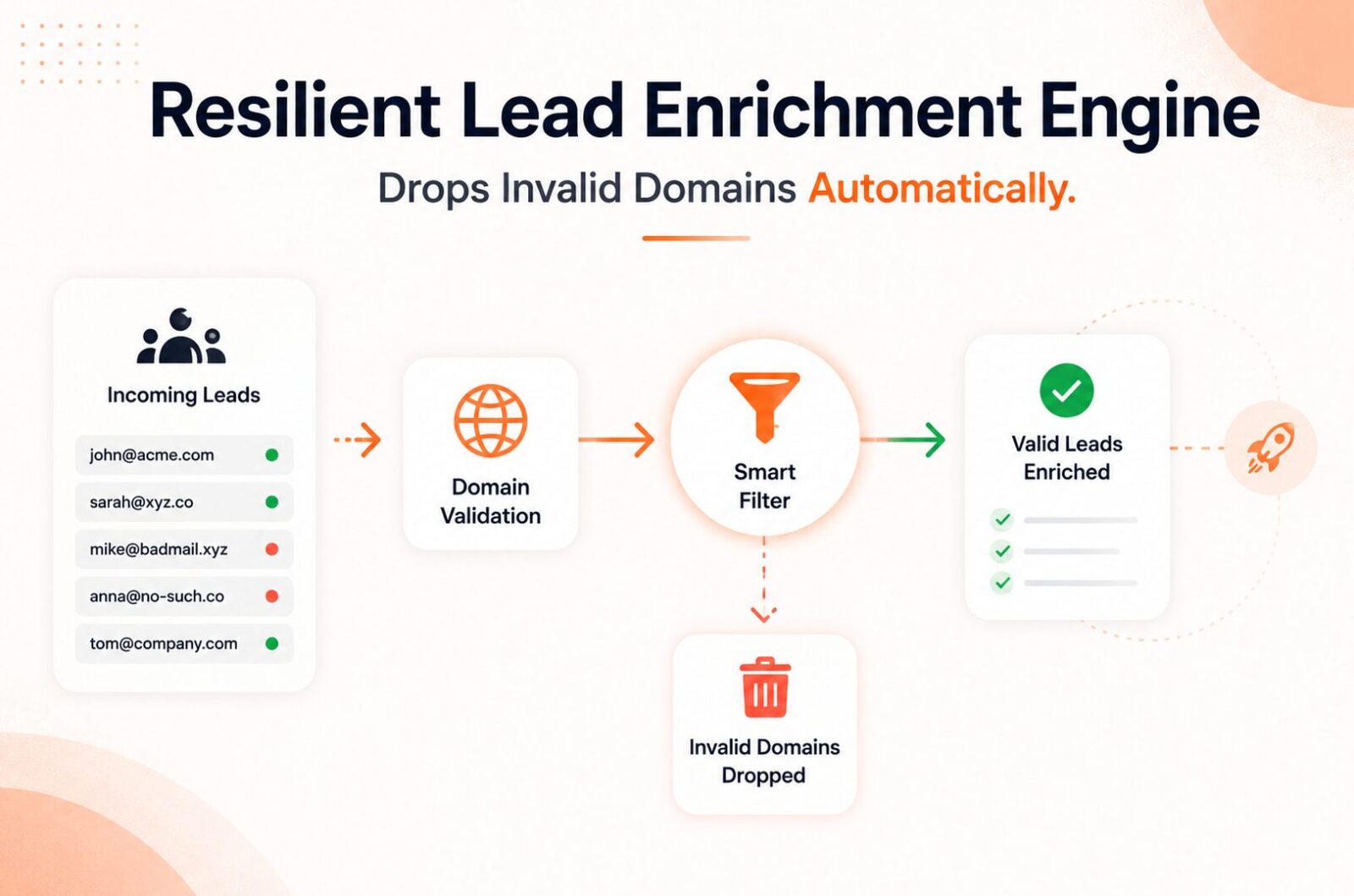
Building a Resilient Lead Enrichment Automation Engine That Drops Invalid Domains Automatically
Affiliate Disclosure: We review products independently. When you buy through our links, we may earn a commission or a compound recurring commission at zero extra cost to you. Read our editorial policy.
Updated: All tool behavior and data verified against vendor documentation on July 17, 2026.
Lead enrichment automation that does not filter domains before enrichment is a credit burning machine. Every Clay Data Credit, every Apollo export slot, every NeverBounce verification call spent on a Gmail address, a disposable domain, or a company that closed two years ago is money that produced nothing downstream. Invalid and low-quality contact data can create costs beyond wasted enrichment credits. It can increase unnecessary outreach volume, reduce campaign efficiency and contribute to deliverability problems when invalid addresses repeatedly enter outbound workflows.
For teams enriching leads at scale, filtering and validating records before they move through paid enrichment steps can help reduce unnecessary credit consumption and keep the underlying CRM data cleaner.
The fix is not a better enrichment provider. The fix is a domain filtering layer that runs before any enrichment credits are consumed. This guide builds that layer and wires it into a full lead enrichment automation pipeline that drops bad domains automatically, validates MX records before touching enrichment APIs, and routes catch-all domains to a verification sub-flow rather than the main enrichment path.
Why Domain Filtering Belongs Before Enrichment, Not After
Most lead enrichment automation pipelines are built in the wrong sequence: enrich first, then clean. A form submission arrives, Clay enriches it, the CRM receives it, then a verification tool flags the email as invalid. Three tools consumed credits on a contact that should have been filtered at step one.
The correct sequence is filter first, enrich only on validated inputs. The filtering step costs a fraction of enrichment credits and runs in milliseconds. MX record validation via a free DNS lookup API is functionally free. Disposable domain checking against a maintained blocklist costs zero enrichment credits. Catch-all domain detection costs one verification credit rather than five enrichment credits.
Enrichment without verification just moves bad data faster. Pairing an email verifier with your enrichment step keeps your bounce rate low and protects sender reputation.
A lead enrichment automation pipeline that filters before enriching eliminates the three most common forms of credit waste:
Personal email domains (Gmail, Yahoo, Hotmail, Outlook) submitted through B2B forms. No enrichment provider returns useful company firmographics from personal email domains.
Disposable email domains (Mailinator, TempMail, Guerrilla Mail, and thousands of similar providers). These addresses are untraceable and untargeted.
Domains with no MX record. A domain with no mail exchange record cannot receive email. Enriching a contact at a domain that cannot receive email produces a verified contact for an unreachable destination.
The Five Validation Layers Before Enrichment
Email validation is not a single check. It is a pipeline of five distinct verification layers, each catching a different class of bad addresses. Skip any layer and you will let garbage into your list.
Each layer in a lead enrichment automation pre-filter catches a different failure mode at a different cost point. Build them in order from cheapest to most expensive.
Layer 1: Syntax Validation
Check that the submitted email follows basic formatting rules. An @ symbol present, a valid domain structure, no illegal characters, correct length limits. This catches typos at the form level. Cost: zero. Run this in Clay as a formula column before any external API call:
IF(REGEXMATCH(email, "^[a-zA-Z0-9._%+-]+@[a-zA-Z0-9.-]+\.[a-zA-Z]{2,}$"), "valid_syntax", "invalid_syntax")
Flag invalid_syntax rows for immediate discard. Do not proceed to Layer 2 on syntax-invalid addresses.
Layer 2: Personal and Role-Based Domain Blocklist
Check the domain portion of the email against a blocklist of personal email providers and role-based address prefixes. Personal email domains include Gmail, Yahoo, Hotmail, Outlook, iCloud, AOL, and approximately 200 other consumer providers. Role-based prefixes (info@, admin@, support@, contact@, hello@, team@) are unreachable for individual-targeted outreach.
In Clay, extract the domain from the email column using a formula: RIGHT(email, LEN(email) - FIND("@", email)). Then run an HTTP API call to a maintained blocklist API or check against a Clay formula using an OR statement covering the 20 most common consumer domains. Rows matching personal or role-based patterns are filtered out before Layer 3.
Layer 3: MX Record Validation
An MX record is a DNS record that specifies which mail server accepts email for a domain. A domain without an MX record cannot receive email, regardless of what enrichment providers return for contacts at that domain.
Run MX validation using a DNS lookup API. Free options: Google’s Public DNS JSON API (https://dns.google/resolve?name={{domain}}&type=MX) or Cloudflare’s DNS over HTTPS endpoint. Both return the MX record status for any domain without requiring an API key or consuming enrichment credits.
In Clay, add an HTTP API column that calls the DNS lookup API with the domain value and checks whether the response includes MX records. A domain returning zero MX records is flagged for discard. This layer costs zero enrichment credits and catches defunct companies, expired domains, and poorly configured business email setups before any paid enrichment runs.
Layer 4: Disposable Domain Detection
Disposable and role-based addresses are the two most common sources of fake email signups that distort every downstream metric including campaign performance, conversion rate, and sales forecasting.
Disposable email detection checks the domain against a continuously updated database of known temporary email providers. The most reliable free option is the open-source disposable email domains list maintained at github.com/disposable-email-domains. This list covers 3,000+ disposable providers and receives regular updates.
In a Clay HTTP API column, call a verification API that includes disposable detection in its response. NeverBounce, ZeroBounce, and Enrich all return a disposable flag as part of their email verification response. Alternatively, self-host the disposable domain list and check it via a lightweight proxy endpoint before the enrichment step.
Layer 5: Catch-All Domain Detection
About 10 to 15 percent of B2B domains are configured as catch-all. Catch-all domains accept all email addresses at the domain regardless of whether the mailbox exists.
A catch-all domain means that anystring@company.com accepts delivery. Enrichment providers that return an email address for a contact at a catch-all domain are returning a technically valid-looking address with unknown deliverability. The address may reach the intended person or it may disappear into a catch-all inbox monitored by no one.
Catch-all detection requires an SMTP handshake test against the mail server. Most verification APIs (NeverBounce, ZeroBounce, Enrich, Bytemine) include catch-all detection as part of their standard verification response. The response flag is typically catch_all: true or a risk level of “risky” or “unknown.”
Catch-all domains require a routing decision, not a discard decision. Discarding all catch-all domain contacts eliminates 10 to 15 percent of B2B leads, many of whom are reachable. The correct lead enrichment automation handling: route catch-all domains to a separate verification sub-flow that attempts additional signals (LinkedIn profile match, phone enrichment, manual review queue for high-ICP accounts) before deciding to enrich or discard.
Building the Pre-Filter Layer in Clay
The pre-filter layer in a Clay-based lead enrichment automation pipeline runs as a sequence of columns before any paid enrichment column fires.
Column sequence:
Column 1: Syntax check (Clay formula, zero cost) Column 2: Domain extraction (Clay formula, zero cost) Column 3: Personal domain flag (Clay formula against blocklist, zero cost) Column 4: MX record validation (Clay HTTP API to DNS API, zero cost) Column 5: Disposable domain flag (verification API call, 1 verification credit per row) Column 6: Catch-all detection (verification API call, 1 verification credit per row) Column 7: Filter gate (Clay formula combining Columns 1 to 6 into pass or discard decision)
Only rows where Column 7 returns “pass” trigger the enrichment columns. Clay’s conditional column feature supports this: configure the enrichment columns to run only when the filter gate column equals “pass.”
Cost comparison:
Without pre-filter: 1,000 form submissions at 10 Clay Data Credits per enrichment record = 10,000 credits. Estimated 35% invalid rate = 3,500 credits wasted on contacts that fail downstream verification.
With pre-filter: 1,000 form submissions at 2 verification credits per row for Layers 5 and 6 = 2,000 credits for filtering. 650 records pass the filter. 650 records enriched at 10 credits each = 6,500 enrichment credits. Total: 8,500 credits. Net saving: 1,500 credits on the enrichment step, better downstream data quality, and zero credits wasted on contacts that bounce.
TSA SCAR: Clay Pre-Filter Credit Timing
Clay’s conditional column feature prevents enrichment columns from running on rows that fail the filter gate. However, if verification API columns (Layers 5 and 6) are configured without conditional logic, they run on every row including those already flagged for discard by Layers 1 to 4. A lead enrichment automation table configured with disposable detection running on all rows, not only syntax-valid, non-personal-domain rows, consumed 1,000 verification credits on rows that were discarded at Layer 1 or 2 before the verification result was even checked. Configure each layer column with a conditional that only runs when all preceding layers pass. Layer 5 should only run when Layers 1 to 4 all return valid. This is a chained conditional, not a single gate column check.
The Waterfall Enrichment Layer
With the pre-filter removing invalid domains, the enrichment waterfall runs only on qualified records. A waterfall in lead enrichment automation means conditional multi-provider enrichment: query Provider A first, and only query Provider B when Provider A returns no result.
Set provider order by ranking sources by accuracy per field type. The best email provider may not be the best phone provider.
Standard 3-provider email waterfall in Clay:
Step 1: Apollo enrichment for US-based company contacts. Apollo hit rate on standard US ICP: 73 to 85 percent. Credit cost: 2 to 3 Data Credits per attempt.
Step 2 (conditional, only when Step 1 returns empty): Hunter.io enrichment for email pattern lookup. Hunter uses domain pattern detection rather than database matching, covering contacts that database providers miss. Credit cost: 1 Clay Data Credit via Clay HTTP API using your own Hunter API key (BYOK bypasses marketplace credits).
Step 3 (conditional, only when Steps 1 and 2 return empty): People Data Labs enrichment for non-standard ICPs, technical titles, and non-US contacts. Credit cost: 4 to 6 Data Credits per attempt.
The conditional waterfall means Provider B costs are incurred only on the 15 to 30 percent of records where Provider A returned nothing. Provider C costs apply only to the subset where both A and B failed. Total credit consumption is 30 to 40 percent lower than running all three providers simultaneously on every row.
Routing Catch-All Domains to a Verification Sub-Flow
Catch-all domains deserve a dedicated routing path rather than blanket discard or blanket enrichment.
High-ICP catch-all domains: If the company ICP score is high (based on firmographic signals like employee count, revenue estimate, industry), route to a manual review queue in a separate Clay table. Assign the row to a RevOps team member for human-assisted verification: check LinkedIn, find a direct email via Sales Navigator, or add to a personalized LinkedIn outreach sequence instead of email.
Mid-ICP catch-all domains: Enrich with phone number as the primary contact method. If the phone enrichment returns a verified mobile number, proceed with outreach via phone or LinkedIn. If phone enrichment also fails, discard.
Low-ICP catch-all domains: Discard. The catch-all deliverability risk at low ICP score does not justify the enrichment credit cost.
In Clay, implement the routing using a Router column that evaluates both the catch-all flag (from Layer 6) and an ICP score column (from a Claygent or firmographic enrichment step). Each route triggers different downstream columns.
CRM Sync Gate: The Final Validation Before Data Enters HubSpot
The last step in the lead enrichment automation pipeline is the CRM sync gate. Before any record writes to HubSpot or Salesforce, a final check confirms the enrichment result meets minimum data quality thresholds.
Minimum sync criteria:
Verified email present (not catch-all, not disposable, valid SMTP response) Company name present (not empty) At least one firmographic field present (employee count, industry, or revenue estimate)
Records that fail any of these criteria are held in a “Pending Review” Clay table section rather than synced to the CRM. A weekly audit clears this section manually or via a Make.com scenario that pulls the pending records, attempts re-enrichment from the next waterfall provider, and re-evaluates against the sync criteria.
This gate prevents lead enrichment automation from polluting the CRM with half-enriched records that sales reps encounter and immediately discard, creating the “bad data in the CRM” problem that ironically causes leadership to question whether the enrichment investment is working.
Buy / Skip Decision Matrix
| Scenario | Verdict |
|---|---|
| Under 200 form submissions per month | Build Layers 1 to 3 only. Manual review covers the rest at this volume. |
| Over 500 submissions per month | Build all 7 pre-filter layers plus the enrichment waterfall. |
| Apollo as single enrichment provider | Add at least MX validation before Apollo. Reduces wasted Apollo exports on non-existent domains. |
| High catch-all rate on target ICP domain segment | Build dedicated catch-all routing sub-flow rather than discarding. |
| Team hitting Clay Launch credit ceiling early in the month | Audit which enrichment columns are running on invalid domains. Pre-filter will recover 25 to 40 percent of credit waste. |
| Lead source is a content download or webinar registration | Personal email rate is higher in these sources. Layer 3 blocklist filtering is particularly important. |
| Running Claygent on all incoming leads without pre-filtering | Stop. Add Layers 1 to 4 before Claygent runs. Claygent on invalid domains at 15 to 30 credits per row is the highest-cost enrichment mistake in Clay. |
FAQ
Why does lead enrichment automation need domain filtering before enrichment credits fire?
Enrichment providers charge per lookup attempt regardless of data quality. A domain with no MX record, a disposable email provider, or a Gmail address submitted through a B2B form all consume the same number of enrichment credits as a legitimate company contact. Pre-filtering these inputs before enrichment runs eliminates 25 to 40 percent of credit waste on a typical inbound lead mix without reducing the quality of the enriched output.
What is the difference between invalid and catch-all domains in lead enrichment automation?
An invalid domain either does not exist, has no MX record, or explicitly rejects the email address at the SMTP handshake level. These should be discarded before enrichment. A catch-all domain accepts all email addresses regardless of whether the specific mailbox exists. Catch-all status means deliverability is unknown, not confirmed invalid. Route catch-all domains to additional verification or to alternative outreach channels rather than discarding them outright.
How many Clay Data Credits does a complete pre-filter pipeline consume per row?
Layers 1 to 4 (syntax, personal domain blocklist, domain extraction, MX validation via DNS API) cost zero Clay Data Credits. Layers 5 and 6 (disposable detection and catch-all detection via a verification API) cost one verification API call each. If using a Clay HTTP API column with your own NeverBounce API key (BYOK), these calls consume only Actions credits, not Data Credits. Total pre-filter cost per row: zero to 2 Data Credits depending on BYOK configuration, versus 8 to 20 Data Credits per enriched row on the main waterfall.
What is the correct order for a 3-provider enrichment waterfall in Clay?
Order providers by coverage rate on the specific ICP target. For US-focused B2B outbound, Apollo typically returns the highest hit rate (73 to 85 percent) and should be Provider A. Hunter.io is effective for pattern-based email lookup and covers contacts missing from Apollo’s database, making it Provider B. People Data Labs covers non-US contacts, technical buyer personas, and niche verticals that Apollo underrepresents, making it Provider C. Run each provider conditionally: Provider B only fires when Provider A returns empty. Provider C only fires when both A and B return empty.
How does the CRM sync gate prevent bad data from entering HubSpot?
The CRM sync gate is a set of minimum data quality conditions that every enriched record must meet before a Make.com or Zapier scenario pushes it to the CRM. Minimum conditions: verified email address, company name, and at least one firmographic field. Records that fail any condition are held in a Clay “Pending Review” section for manual audit or re-enrichment, rather than syncing to HubSpot as incomplete records. This keeps the CRM data quality high and prevents reps from encountering contacts that have no useful outreach information.
Can this lead enrichment automation pipeline work on Zapier instead of Clay?
The pre-filter layers (syntax, domain extraction, MX validation, disposable detection) can be built in Zapier using Formatter steps for syntax and domain logic, HTTP steps for DNS API calls, and a verification API integration for Layers 5 and 6. The waterfall enrichment layer is harder to replicate in Zapier due to Zapier’s linear workflow model. Conditional branching in Zapier (Paths) can approximate waterfall logic but adds significant task consumption per record compared to Clay‘s native conditional column architecture.
